CloudFlare provides web performance and security solutions, enhancing site speed and protecting against threats.
Service URL: developers.cloudflare.com (opens in a new window)
cf_ob_info
The cf_ob_info cookie provides information on: The HTTP Status Code returned by the origin web server. The Ray ID of the original failed request. The data center serving the traffic
session
__cfseq
Sequence rules uses cookies to track the order of requests a user has made and the time between requests and makes them available via Cloudflare Rules. This allows you to write rules that match valid or invalid sequences. The specific cookies used to validate sequences are called sequence cookies.
session
cf_clearance
Whether a CAPTCHA or Javascript challenge has been solved.
session
_cfuvid
The _cfuvid cookie is only set when a site uses this option in a Rate Limiting Rule, and is only used to allow the Cloudflare WAF to distinguish individual users who share the same IP address.
session
__cflb
When enabling session affinity with Cloudflare Load Balancer, Cloudflare sets a __cflb cookie with a unique value on the first response to the requesting client. Cloudflare routes future requests to the same origin, optimizing network resource usage. In the event of a failover, Cloudflare sets a new __cflb cookie to direct future requests to the failover pool.
session
__cf_bm
Cloudflare's bot products identify and mitigate automated traffic to protect your site from bad bots. Cloudflare places the __cf_bm cookie on End User devices that access Customer sites that are protected by Bot Management or Bot Fight Mode. The __cf_bm cookie is necessary for the proper functioning of these bot solutions.
session
__cfruid
Used by the content network, Cloudflare, to identify trusted web traffic.
session
cf_chl_rc_m
These cookies are for internal use which allows Cloudflare to identify production issues on clients.
session
cf_chl_rc_ni
These cookies are for internal use which allows Cloudflare to identify production issues on clients.
session
cf_chl_rc_i
These cookies are for internal use which allows Cloudflare to identify production issues on clients.
session
__cfwaitingroom
The __cfwaitingroom cookie is only used to track visitors that access a waiting room enabled host and path combination for a zone. Visitors using a browser that does not accept cookies cannot visit the host and path combination while the waiting room is active.
session
cf_use_ob
The cf_use_ob cookie informs Cloudflare to fetch the requested resource from the Always Online cache on the designated port. Applicable values are: 0, 80, and 443. The cf_ob_info and cf_use_ob cookies are persistent cookies that expire after 30 seconds.
session



Nice one corey thanks for this came in real use 😛
Hi there I just wanted to compliment you on the newest video addition you uploaded, you did a great job at creating this and commend you for the technique. I have seen this done before but a poor recreation at best. i truly enjoy your videos and i am glad that i bumped into your site by accident.
its nice and cool
How about a dollar bill now? Its too hard to counterfeit coins 🙂
This effect could be used in making etchings into photgraphed trees or mountains, you think? I’d really like to see what mount Rushmore looks like with my face instead 🙂
Thanks for all your free lessons you’ve defiantly inspired me and many others i’m sure. I’ve become huge a planetphotoshop fan.
Is there a short cut to toggle between tools in the too pallet?
let say i type “L” for lasso tool, but i want the Magnetic lasso tool is there a way to scroll down?
Thanks Ray
wow corey, this tutorial is great! can we make it also in PSE?
you are a PS wizard (miss you on pse user tuts)
Yes! Thank you, I’ve been trying to do this properly for weeks. Didn’t think about using alpha channels. Thanks, this helped a lot.
nice web I like the tutorial
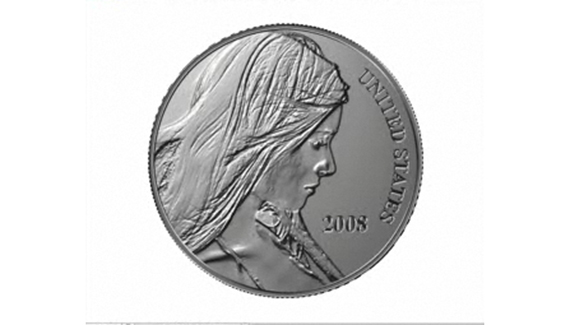
This was yet another great tutorial. I was somewhat dissatisfied with the “copper coin” at the conclusion, so I tweaked the colors to get a darker, more used-looking coin. Still didn’t quite look right, so I added another layer, selected the coin to create a mask. I went into filters->render->clouds and filled the selection with clouds. I then went into blending options, and set fill opacity to 75%, and set the mode to color dodge. Suddenly I had a shiny new penny!
I used an image of Charlize Theron as the source model, and I’ve put a copy of the finished product on my home page in case anyone wants to see my results.
Are there any written directions for this coin tutorial? You went way too fast for me but I love the idea and want to try.
it’s good idea
inspiring work !
fast tutorial though…..pretty cool
Keep it up… Good one!
Márcio Guerra
Good tutorial ^_^, thanx Corey
How can you do this in paint shop pro ? I like this coin and would like to do this any clues?
THANK YOU VERY MUCH THIS WAS VERY HELPFUL TO ME
thanksssssss man its soo soo sooooooooooo cooooooooooooooLL
its so good tutorial simple and effective
This is so great. Needed it for a metal sculpture image project. Thanks
thanks! this was a very useful tutorial.
its nice and cool
thanks a lot~ it’s really cool^^..
Thanks so much for this lesson! The coinage is beautiful!
Hi Corey, another fantastic tutorial. Here is my coin collection you helped me create.
http://www.flickr.com/photos/dereksbeard/3328703809/
this is a very nice tutorial, but i was looking for something a little bit diferent…. do you have any tutorial where u teach how to do a coin but that golden coins like the old civilizations and like we see in the pirates movies? i really need to know how to do that for a work i have in progress… can yoou help me? thanks…
Very nice tutorial!!!
This is the best site in the world!
Ramon Duzzioni
Brazil
this worked amazingly well, i’m really happy with the result. i went on to use my coin to create an image reminiscent of the opening of the first pirates of the carribean-a coin being dropped into a large pile. i noticed that when i rotated the coin 180 degrees, it looked like the embossing had reversed. is there a quick way to change the lighting?
To Display Fill dialog box, why my shortcut is Shift + F5, but yours is Shift + Del?
Hey…..You did a bang-up job on this presentation, truely OUTSTANDING! You have given me a lot of great ideas on the desiging of my coin.
THANKS!!!
respect!!! a very good tutor!!! Pro…