CloudFlare provides web performance and security solutions, enhancing site speed and protecting against threats.
Service URL: developers.cloudflare.com (opens in a new window)
cf_ob_info
The cf_ob_info cookie provides information on: The HTTP Status Code returned by the origin web server. The Ray ID of the original failed request. The data center serving the traffic
session
__cfseq
Sequence rules uses cookies to track the order of requests a user has made and the time between requests and makes them available via Cloudflare Rules. This allows you to write rules that match valid or invalid sequences. The specific cookies used to validate sequences are called sequence cookies.
session
cf_clearance
Whether a CAPTCHA or Javascript challenge has been solved.
session
_cfuvid
The _cfuvid cookie is only set when a site uses this option in a Rate Limiting Rule, and is only used to allow the Cloudflare WAF to distinguish individual users who share the same IP address.
session
__cflb
When enabling session affinity with Cloudflare Load Balancer, Cloudflare sets a __cflb cookie with a unique value on the first response to the requesting client. Cloudflare routes future requests to the same origin, optimizing network resource usage. In the event of a failover, Cloudflare sets a new __cflb cookie to direct future requests to the failover pool.
session
__cf_bm
Cloudflare's bot products identify and mitigate automated traffic to protect your site from bad bots. Cloudflare places the __cf_bm cookie on End User devices that access Customer sites that are protected by Bot Management or Bot Fight Mode. The __cf_bm cookie is necessary for the proper functioning of these bot solutions.
session
__cfruid
Used by the content network, Cloudflare, to identify trusted web traffic.
session
cf_chl_rc_m
These cookies are for internal use which allows Cloudflare to identify production issues on clients.
session
cf_chl_rc_ni
These cookies are for internal use which allows Cloudflare to identify production issues on clients.
session
cf_chl_rc_i
These cookies are for internal use which allows Cloudflare to identify production issues on clients.
session
__cfwaitingroom
The __cfwaitingroom cookie is only used to track visitors that access a waiting room enabled host and path combination for a zone. Visitors using a browser that does not accept cookies cannot visit the host and path combination while the waiting room is active.
session
cf_use_ob
The cf_use_ob cookie informs Cloudflare to fetch the requested resource from the Always Online cache on the designated port. Applicable values are: 0, 80, and 443. The cf_ob_info and cf_use_ob cookies are persistent cookies that expire after 30 seconds.
session



Thanks Cory,
Cool tutorial. Can see myself using that one soon.
Cheers,
Mark
This is cool. But I could not do the animation part. I am using Adobe Photoshop 7. Any body knows? Thanks.
great tutorial!
you are awesome with animations 😀
Elizabeth: I think it only works with CS3 Extended :/
worthwile, very worthwile – gonna see if I can reproduce it myself that easily…
Great tutorial, but when I play through the finished product, it goes slow the first time like you said it would but after it goes through multiple times it still moves at a very slow FPS rate… Is there a way to fix this?
it is very nice tutorial. i have learned a lot. i have tried it and i was be able to do. Also i enjoyed a lot. thanks for this wanderful tutorial.
Hey Cory Your tutorial is grt, but how do i save this?!?!!?
Hi, I was wondering if you could do animations in photoshop cs2, if so, where is it? i would appreciate it if you would email me, and INCREDIBLE TUTORIAL by the way
My gosh this is incredible, what can’t photoshop do?
You’re amazing 🙂
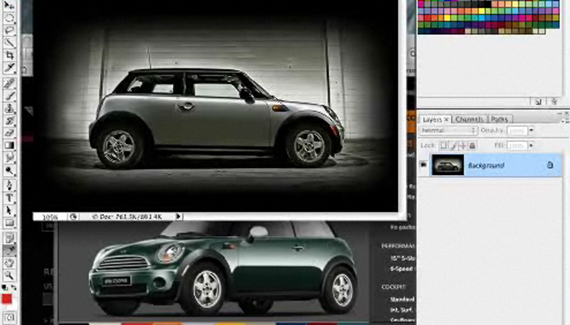
And your car’s so cute, lol, i love minis.
x
you are one amazing artist.
Hey Corey, i couldn’t do it =( i can’t get overlay to change, but i keep trying!
(CS2 9.0)
This site very useful for me to learn some new things in photoshop .My best wishes to this site designers and host.
I liked how u filled the car to badge colour so quickly, thats a trick i’ll be using =]
Nice work, man!
For those with problems, only works on Photoshop CS3, but Extended… Yep… It sucks… For the one who asked about the keyframe rate, or something like it, in the fly out menu you have some options for the video! Good luck.
And thanks for these great tutorials…
Márcio Guerra
Jestes moim bogiem 🙂 You’re my GOD 😛
this is amazing!!
but uhmm what format do i save it in? =|
SWEEEET!
I too need to know how to save this file to maintain the color changing goodness…I tried .gif but it says i must flatten the image and discard the animation…which of course is not what I want.
any help would be greatly appreciated!
Im going to close this document and lose what i did, but since the tutorial was so well explained i can do it again any time!
with regards
josh
This one is great…I am a disciple….:)
@ David. Look in, window>then open animation platte.
For formatting, save as a GIF. and then save as Interlaced.. i had trouble formatting too but i figured out that
yes yes!! thanks so much Ryan!
I went into the Save(optimize) for Web dialogue box [Shft+Ctrl+Alt+S]
and changed around a few setting, I selected Interlaced as you said, and I also had to change the Color Reduction Algorithm to “Windows” to get rid of the icky appearance of the GIF under its default algorithm.
and sufficed to say, it worked! I ended up with this!
Man that tut rocks, great job!!
this is great! im doing a movie poster for graphic design, im in 11th grade.. and it’s really well explained im going to try using it tomorrow. hopefully saving isn’t a problem!! good work corey
I like this tutorial, my wife and I have a BRG Cooper S, I love driving that thing, it’s like driving a go-cart!
Hi Great master..
thanks for all stuff..
🙂
I did it with original red, when I put the color on layer by Layer style, only works with blend mode color….
blend mode overlay only works with lite background color (as the gray one wich scott took for you)…
thanks again…
Cheers…
Yeah for CS4 (normal) the overlay does not work, but if you change it to color or hue the color pops right out…. so maybe it is b/c im not using an “Extended” edition.