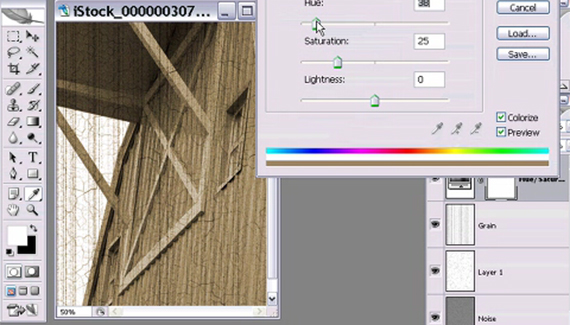
Matt Kloskowski, Education and Curriculum Developer for the National Association of Photoshop Professionals, shows you how to give your photos an antique look.

Posted by Matt Kloskowski
Matt Kloskowski is the Education and Curriculum Developer for the National Association of Photoshop Professionals. He has authored and co-authored five books on Photoshop and Illustrator and teaches an advanced Photoshop course for Sessions.edu. In addition to being an Adobe Certified Expert in Photoshop and a Macromedia Flash Certified Developer, Matt is a regular contributor to Photoshop User and Layers magazines and writes weekly columns for several digital imaging websites.
If you like the crackling effect, I tried a few different things that I think really made it look more natural.
First, I created my new layers as a duplicate of the background -that way you can add effects knowing how they’ll affect the original picture better.
Second, I selected different areas and used different crystal sizes to make the crystalization look more random/natural. I used a 50 pixel feather between the areas so they would run together more smoothly.
If you did this using a duplicate copy of the background, you now need to desaturate your edges to get the right effect.
Then after finding the edges, I picked out parts of the picture that I did not want as crackled as others. I selected those areas and decreased the contrast while increasing the brightness to fade the cracks into the background.
Lastly, I used an embossing filter on the whole thing to give it a real cracked look. I used a dept of only about 3 pixels.
If you use a low opacity, you can use multiple layers like these to get an even more natural effect.
It would have been nice to see the completed picture for longer than a micro second.
Pingback: Photoshop Video Tutorials | Photoshop | Best collection of free video tutorials on software and internet applications
Thanks for an awesome tutorial. It was just what I was looking for.
Pingback: 56 Absolutely Brilliant and Intriguing Photoshop Video Tutorials | Photoshop Tutorials
Pingback: 56 Absolutely Brilliant and Intriguing Photoshop Video Tutorials | huibit05.com
Pingback: Photoshop Video Tutorials | My Tech way
Pingback: 56 Absolutely Brilliant And Intriguing Photoshop Video Tutorials « Photoshop.vn – Your Design Resource
Pingback: 56 Absolutely Brilliant and Intriguing Photoshop Video Tutorials
Pingback: Photoshop app / plugin? - The Photo Forum - Photography Discussion Forum
Pingback: Brilliant and Intriguing 50+ Photoshop Video Tutorials | oOrch Blog
AHH! thank you for this! (: It helped TONS!
If you like the crackling effect, I tried a few different things that I think really made it look more natural.
First, I created my new layers as a duplicate of the background -that way you can add effects knowing how they’ll affect the original picture better.
Second, I selected different areas and used different crystal sizes to make the crystalization look more random/natural. I used a 50 pixel feather between the areas so they would run together more smoothly.
If you did this using a duplicate copy of the background, you now need to desaturate your edges to get the right effect.
Then after finding the edges, I picked out parts of the picture that I did not want as crackled as others. I selected those areas and decreased the contrast while increasing the brightness to fade the cracks into the background.
Lastly, I used an embossing filter on the whole thing to give it a real cracked look. I used a dept of only about 3 pixels.
If you use a low opacity, you can use multiple layers like these to get an even more natural effect.
Pingback: T » Blog Archive » make photo look old
Pingback: 56 Absolutely Brilliant and Intriguing Photoshop Video Tutorials | ent-spa
Pingback: Antique pictures
Pingback: Antque pictures
Pingback: Agents » Blog Archive » Antique style pictures
This was so much help! It was exactly what I was looking for! Thank you!

